Skip to content

AI project delivery

Every job planned. Every handover clean.

Programmes, tenders and contracts, inspections and defects, and a handover that checks itself, with Q, Route Royal’s built-in AI, working on every task beside you.

  • Ask QWhere does the roofing stand?
  • Ask QBreak the kitchen fit-out into subtasks
  • Ask QDraft an update on the first fix

Scroll to run the job

01 / 05·Programme and tasks

A programme the whole team can follow.

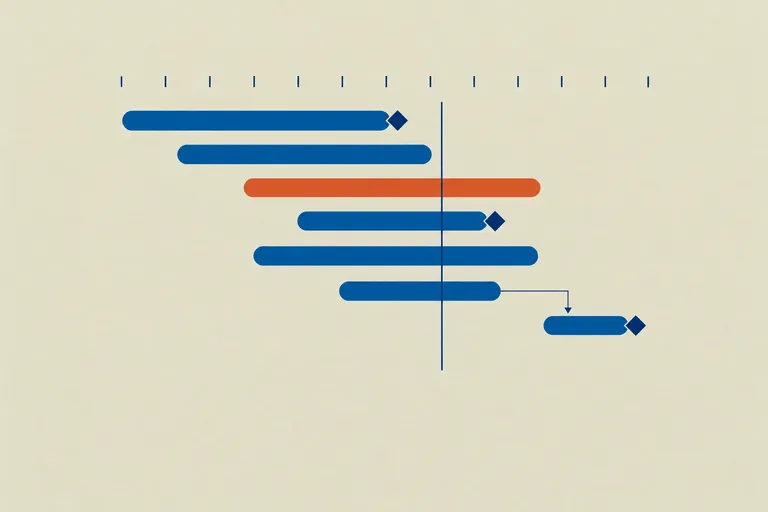
Start from a template with the milestones and labels in place, then run the work on a board, a list, sprints or a timeline that draws what depends on what. A task shows as blocked while anything before it is still open.

Ask QWhat’s due on the Hillcrest build this week?
02 / 05·Procurement and contracts

Buy on the record, and keep the cost in view.

Put the work out to tender, compare the offers side by side and award the best one, which can become the contract and the order. Variations and progress payments run on the contract, and the project keeps budget, committed and forecast cost side by side.

03 / 05·Inspections, RFIs and defects

Inspect it, query it, put it right.

Record inspections against ready-made checklists for every stage of a build, with photos on the record. A failed item becomes a defect with its photos and an owner, and every RFI waits in one register with its due date.

04 / 05·AI on every task

Ask Q, and the work moves.

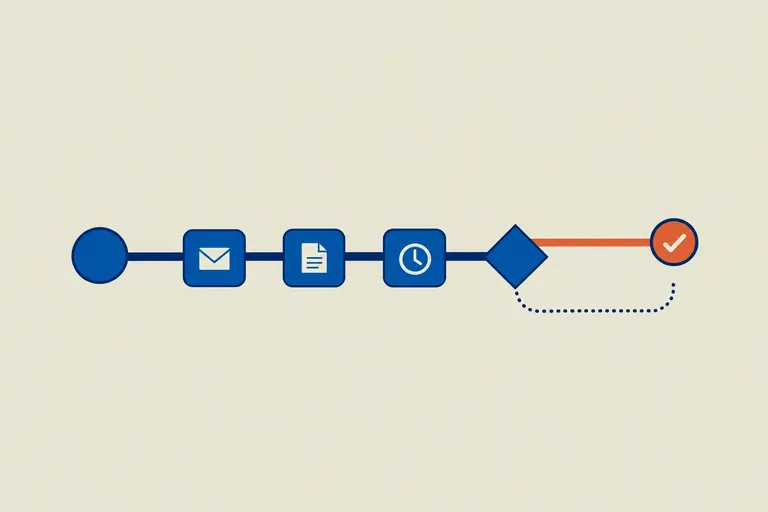
Q is on every task. Ask it to break the work into subtasks, say where things stand, estimate the effort or point out what’s missing, and it drafts the update too. Anything Q changes waits for your approval.

Ask QBreak the kitchen fit-out into subtasks

05 / 05·Decisions, handovers and warranties

Signed off, handed over, nothing left open.

Clients approve decisions and variations from a link or their own portal. The handover checklist checks itself, from closed defects to passed inspections and warranties in place, and each warranty reminds you before it ends.

Q, built in

An AI that works the job with you.

Q is not a chatbot bolted on the side. It works on the same tasks your team does, with their comments, subtasks and dates, and it asks before it changes anything.

  • Break the kitchen fit-out into subtasks

    Q suggests the steps and adds them to the task as subtasks.

  • Where does the roofing stand?

    Q reads the task, its subtasks and comments, and tells you.

  • Draft an update on the first fix

    Q writes the update from the task’s progress, ready to share.

  • Make the plastering wait for the first fix

    Q links the two tasks, so the plastering shows as blocked until the first fix is done.

  • Give this to Priya and move it to In progress

    Q assigns the task and moves it on the board once you approve.

  • Log three hours on the scaffold check

    Q logs the time against the task, ready for approval.

Prefer Claude or ChatGPT?

Connect them in one click. Route Royal is a complete MCP server, so the AI you already use can log an RFI, raise a defect or move an inspection along, within the permissions you grant.

How Route Royal works with AI

The full set

Everything a job runs on, start to finish.

Thirteen modules on one project, so every task, contract, inspection and defect lands on the job it belongs to.

Run the job

  • Projects and milestones

    Projects from templates, with milestones, budgets, portfolios, and board, timeline and workload views.

  • Tasks

    Assignees, dependencies, subtasks, comments, attachments, custom fields and time you approve.

  • Meetings

    Site and client meetings with actions that carry forward, and minutes issued as a PDF.

  • Client portal

    Share chosen tasks, milestones, documents and decisions with your client, who signs off in their own portal.

Buy and agree

  • Procurement

    Tenders with offers compared side by side, and orders tracked from need to delivery.

  • Suppliers

    Trades, licences and insurance, with a reminder before cover runs out.

  • Contracts

    Works, supply and service contracts with variations, progress payments, retention and a running statement.

  • Decisions

    Selections, variations and approvals, signed off by the client from a link.

Build it right

  • Inspections

    Ready-made checklists for every stage of a build, with photos, reinspections and certificates.

  • RFIs

    Requests for information and other queries, each with an owner, a due date and the answer on record.

  • Defects

    Snags and defects with photos, severity and an owner, raised by hand or from a failed inspection.

  • Handovers

    Checklists that tick themselves as defects close, inspections pass and warranties go in.

  • Warranties

    Manufacturer, workmanship and structural warranties, with a reminder before each one ends.

Your demoSee Projects on your own businessBook a demo and we’ll walk you through it with your own listings, stock or projects.Book a demo

Through to handover

Tick it off, all the way to handover.

Run the programme, tick the work off as it’s done and ask Q on any task. The handover checks itself. See it on your own jobs with the team, or start a free trial today.

An example job on a timeline: five tasks from groundworks to the kitchen fit-out, the frame inspection, and the handover checklist, which ticks itself once the work is done.

Hillcrest buildTimeline

Done5/5

Weeks

Added to the task · 3 subtasksUnitsWorktopsAppliancesApproved by you
  • Frame inspectionPassed
  • Hand over

Handover checklist

4/4

Nothing left open.

  • Inspection passed
  • Defects closed
  • Warranties in place
  • Documents linked
Handed over
Tick a task, or ask Q, to move the job on.